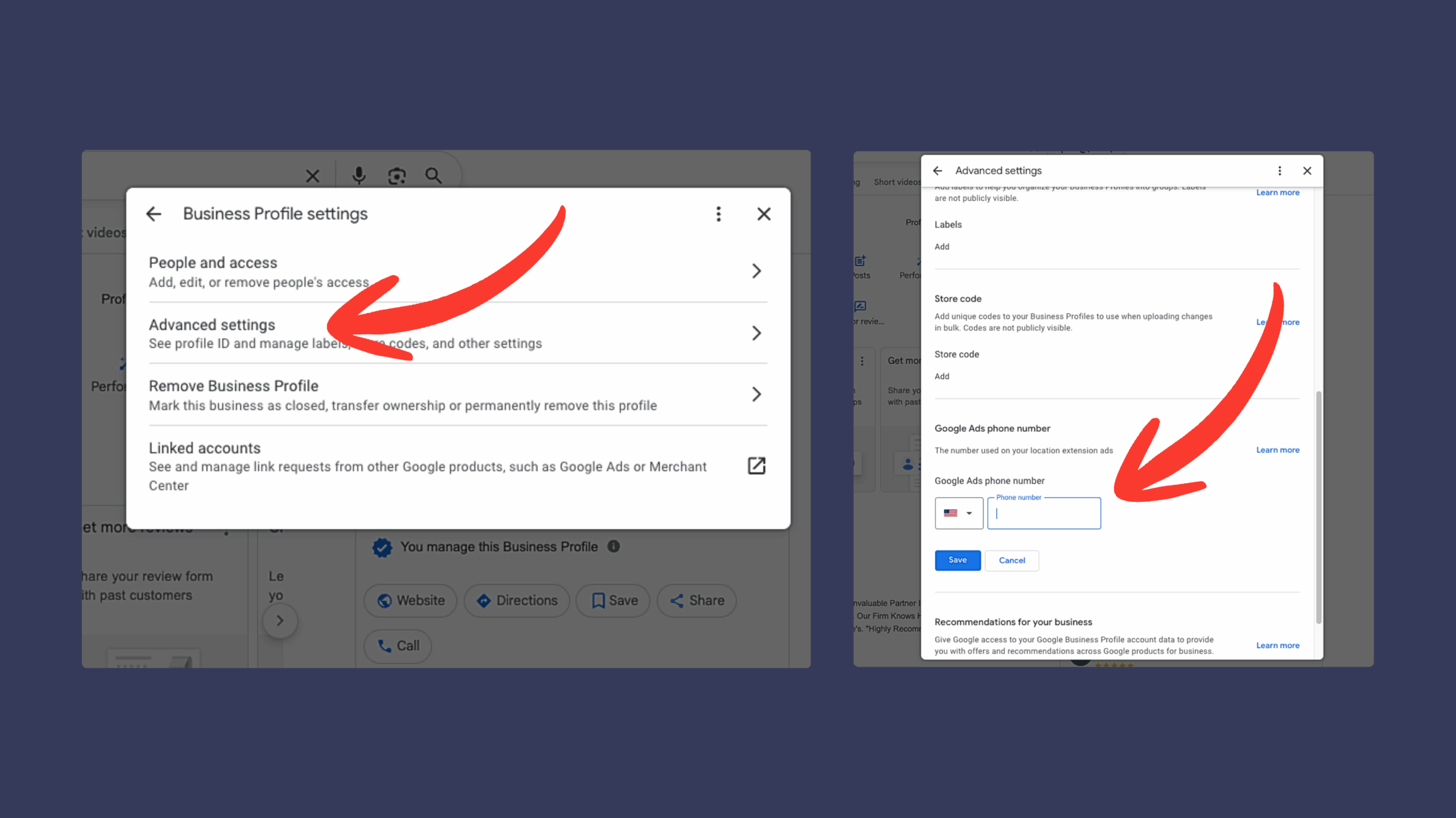
If your law firm is using a tracking number in Google Ads for their phone call leads, the Google Ads phone number feature on Google Business Profiles just became a lot more relevant. This feature allows firms to add their Google Ads call extension number directly to their Google Business Profile.
If you’re using call tracking with your ads, the phone number usually doesn’t match the number shown on your GBP, but having a feature to add in your Google Ads extension phone number has been helpful in preventing call asset disapprovals by giving Google a point of reference to verify these numbers, which are typically not present, or not static, on the sites where ads are pointing that Google would typically crawl. Beyond just that, currently if Google serves an ad on the map pack or in the new RSA map format then having this shows your Google call extension instead of the main GBP number and so lets us have more visibility into these calls that would not be tracked without using this feature.
it should reduce confusion and help keep trackable call assets running when it matters most. And in legal marketing, better tracking almost always means better results.
To get to this setting, pull up your GBP, then click the three dots at the top right of the profile, then advanced settings, then scroll all the way to the bottom and add Google Ads phone number, done!